Managing ApplicationSets in the Web UI
Warning
Alpha Feature (Since v3.5.0)
This is an alpha feature. The look, behavior, and APIs it consumes may change in future releases or be removed in backwards-incompatible ways.
The Argo CD Web UI includes views for ApplicationSets, with a list page, a resource tree, a slide-out details panel, and a preview tab that lets you see what Applications an ApplicationSet will generate.
ApplicationSets can also be managed outside the UI through:
- The CLI -
kubectlor theargocd appsetcommand - The generated child Applications, viewed individually in the UI
- A parent App-of-Apps, if the ApplicationSet was one of its managed resources
ApplicationSets list page
The /applicationsets page is the entry point. It lives next to the
existing Applications list and shares the same filtering, search, and
view-preferences, so it should feel familiar.
You can reach it from the top-level navigation, or directly at
https://<your-argocd>/applicationsets.
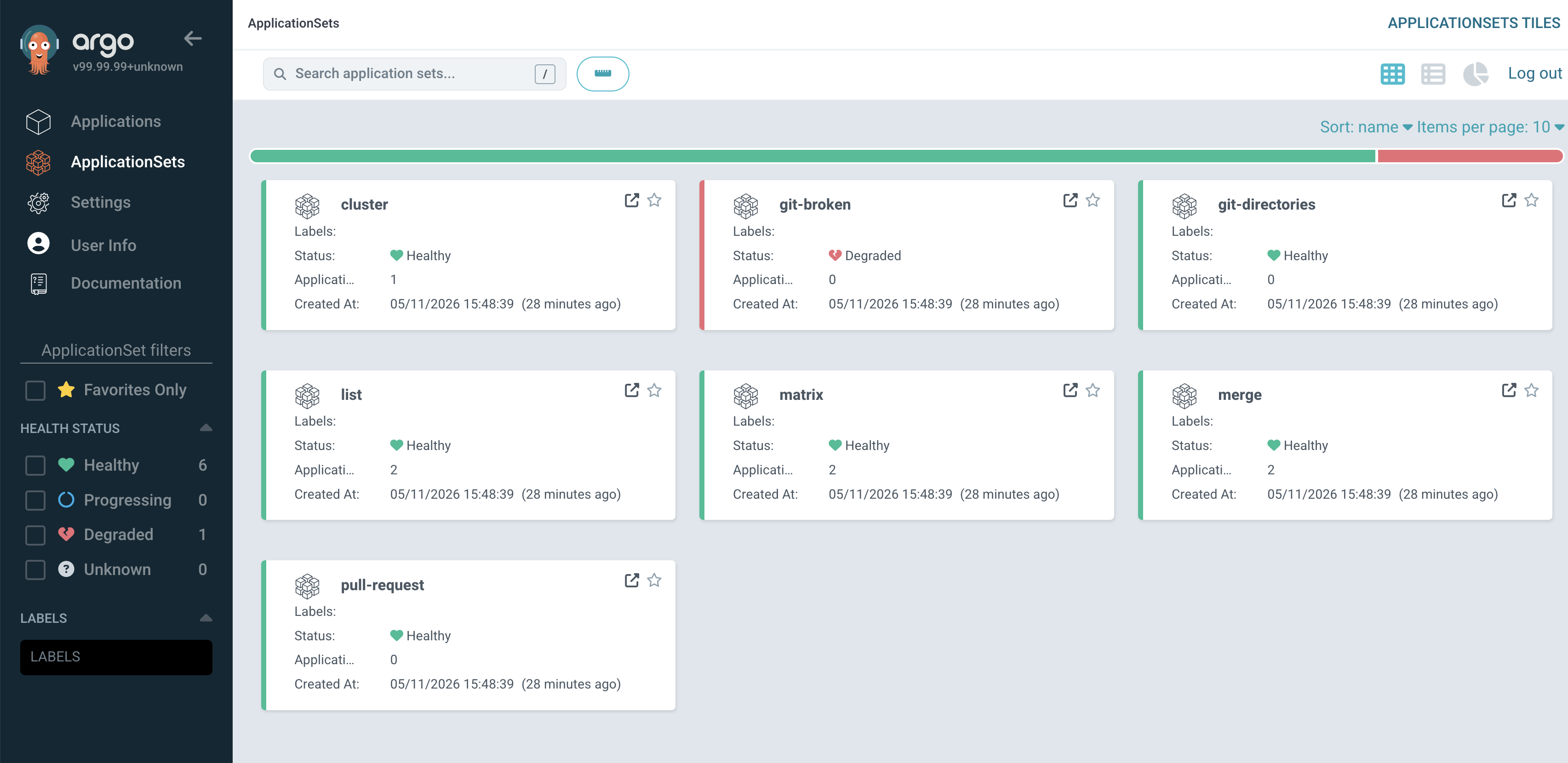
What's on the page:
- Search bar — substring matches against name and namespace. Use the
keyboard shortcut
/to focus it. - Filters sidebar — filter by project, namespace, labels, and
ApplicationSet health status (
Healthy,Progressing,Degraded,Unknown). Filters are reflected in the URL so they can be shared or bookmarked. - Health summary — a pie chart at the top summarizes the health of ApplicationSets matching the current filter.
- Tile / table views — toggle between a tile grid and a table view. The table view shows name, namespace, project, health, conditions, and the number of generated Applications.
Tip
The page shows ApplicationSets across every namespace your user has
access to. RBAC is enforced exactly as on the CLI — if you can get an
ApplicationSet from argocd appset get, you can see it here.
ApplicationSet resource tree
Selecting an ApplicationSet from the list opens its details page. The center of the page is a resource tree that visualizes the ApplicationSet and the child Applications it generates.
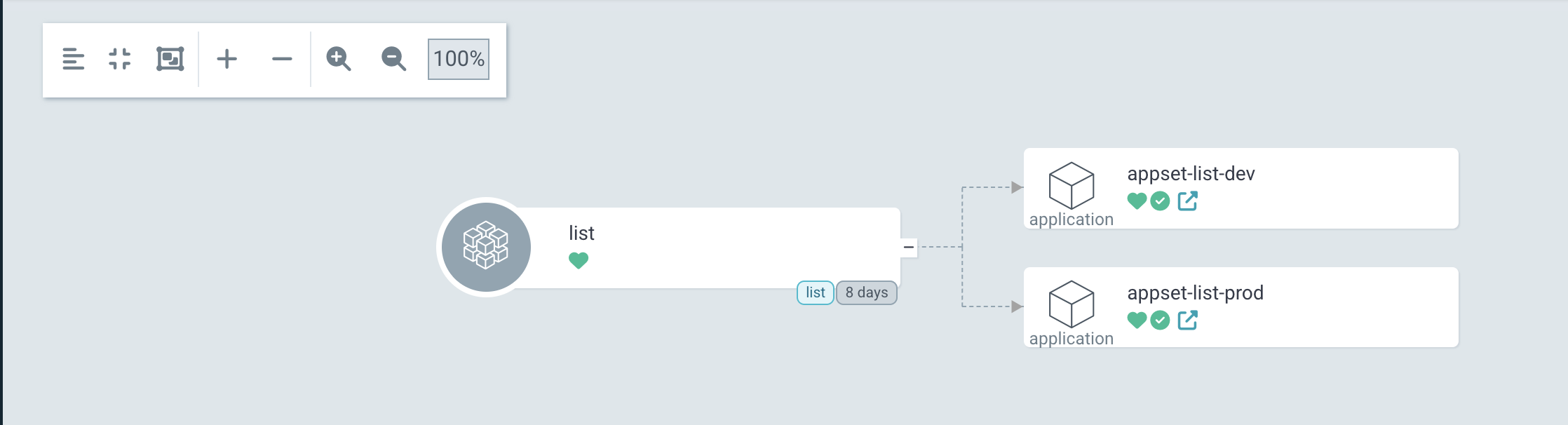
Things to know:
- The root node is the ApplicationSet itself. Each downstream node is a child Application generated by the ApplicationSet.
- Health and sync status icons render on each node the same way they do on the Application resource tree.
- Clicking a child Application navigates to that Application's own details page.
Status bar: health, conditions, age
The top of the ApplicationSet details page shows a status bar summarizing the ApplicationSet at a glance: its health, the count of conditions by severity, and last updated.

Health is derived by the ApplicationSet controller from the
ApplicationSet's status.conditions and surfaced through the
status.health field on the resource. For the controller-side derivation
rules and how the field is populated, see
ApplicationSet Web UI.
Conditions
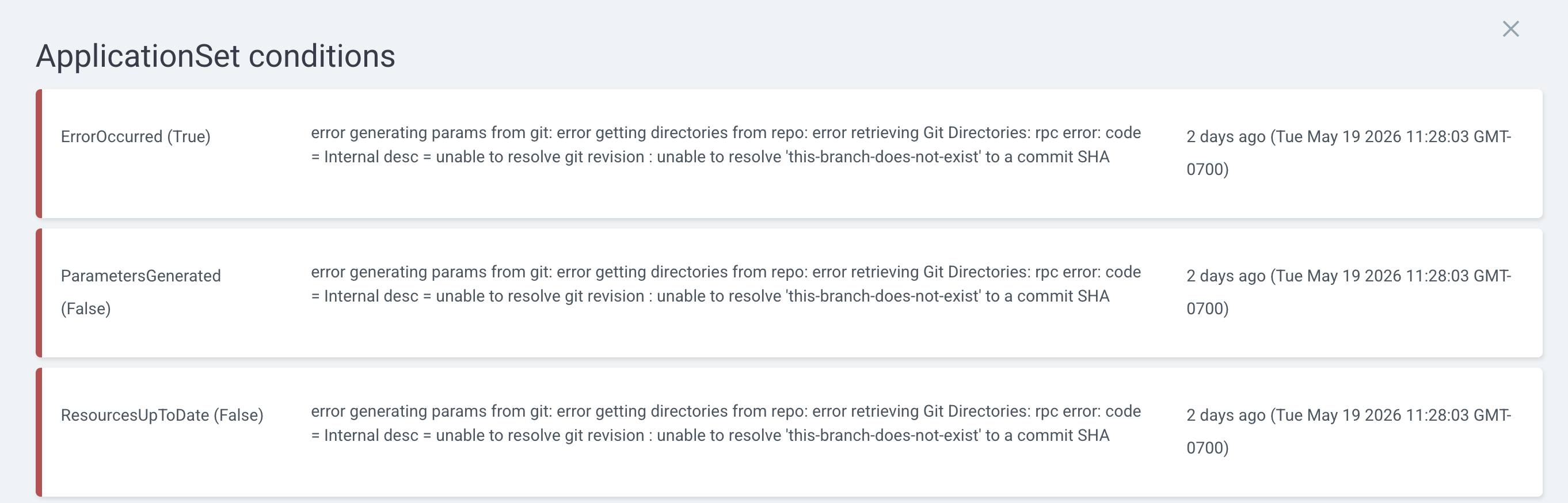
The conditions modal shows each condition's type, status, the message reported by the controller and when it was last reported. This is usually the first place to look when an ApplicationSet shows up as Degraded or Unknown.
Slide-out panel: Summary, Manifest, Events, Preview
Clicking the ApplicationSet node (or any node on the tree) opens a slide-out panel from the right edge of the screen — the same pattern used elsewhere in Argo CD for resource details.
Summary
Shows metadata at a glance: name, namespace, creation timestamp, health, conditions, labels, annotations, and sync policy.
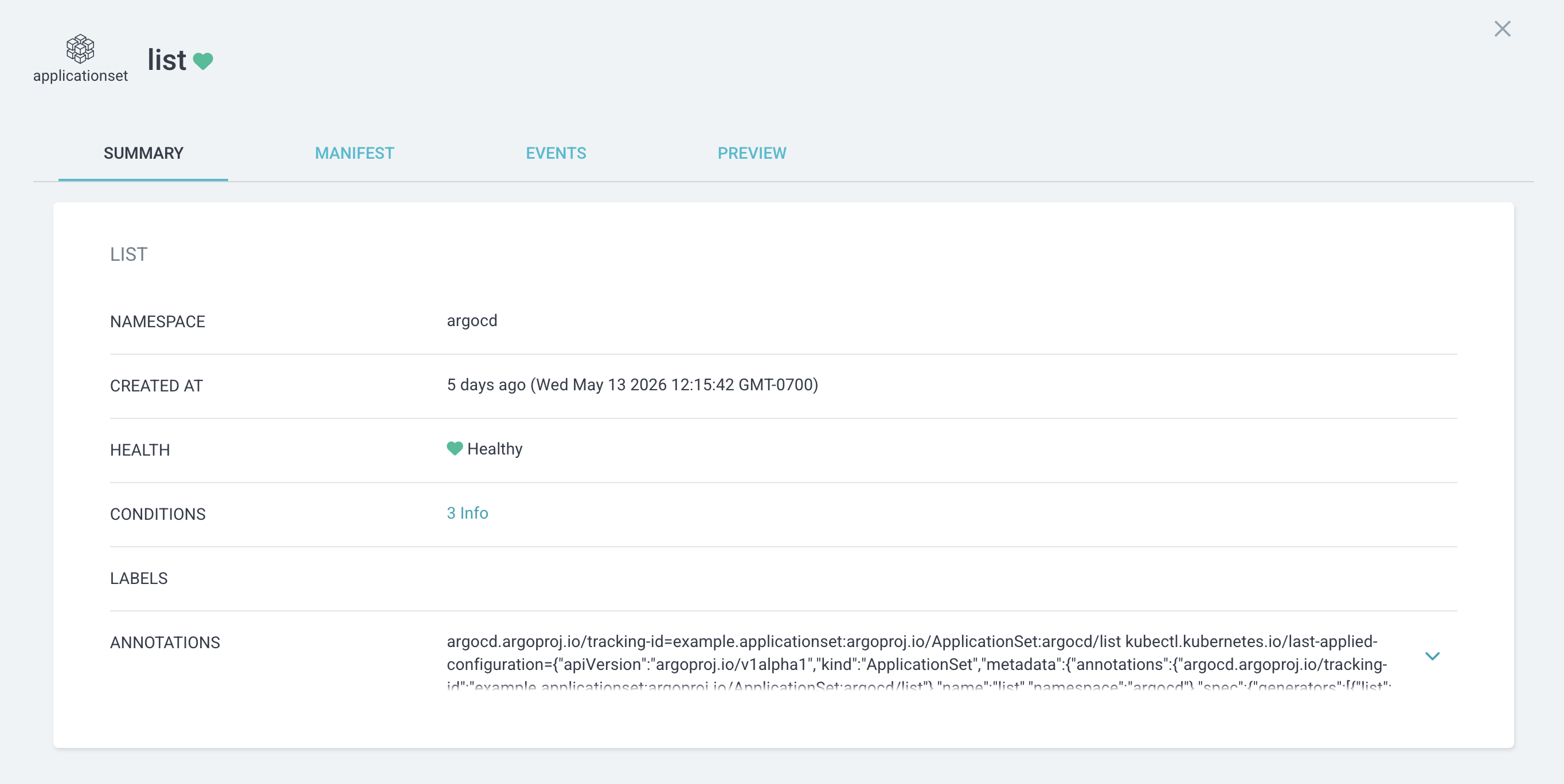
If the ApplicationSet has conditions, the CONDITIONS row links to a detailed conditions view so you can see warnings or errors raised by the controller (for example, a generator that failed to evaluate).
Manifest
A read-only YAML view of the ApplicationSet's spec.
Events
Kubernetes events for the ApplicationSet — useful when investigating why a particular generator parameter set produced (or failed to produce) an Application.
Preview
The Preview tab renders the Applications an ApplicationSet would generate, with a diff against the live state. It is covered in detail in the next section.
Preview: see what your ApplicationSet will generate
The PREVIEW tab shows the Applications an ApplicationSet would generate from its current spec. When you edit the spec, a diff between the proposed output and the live state is rendered.
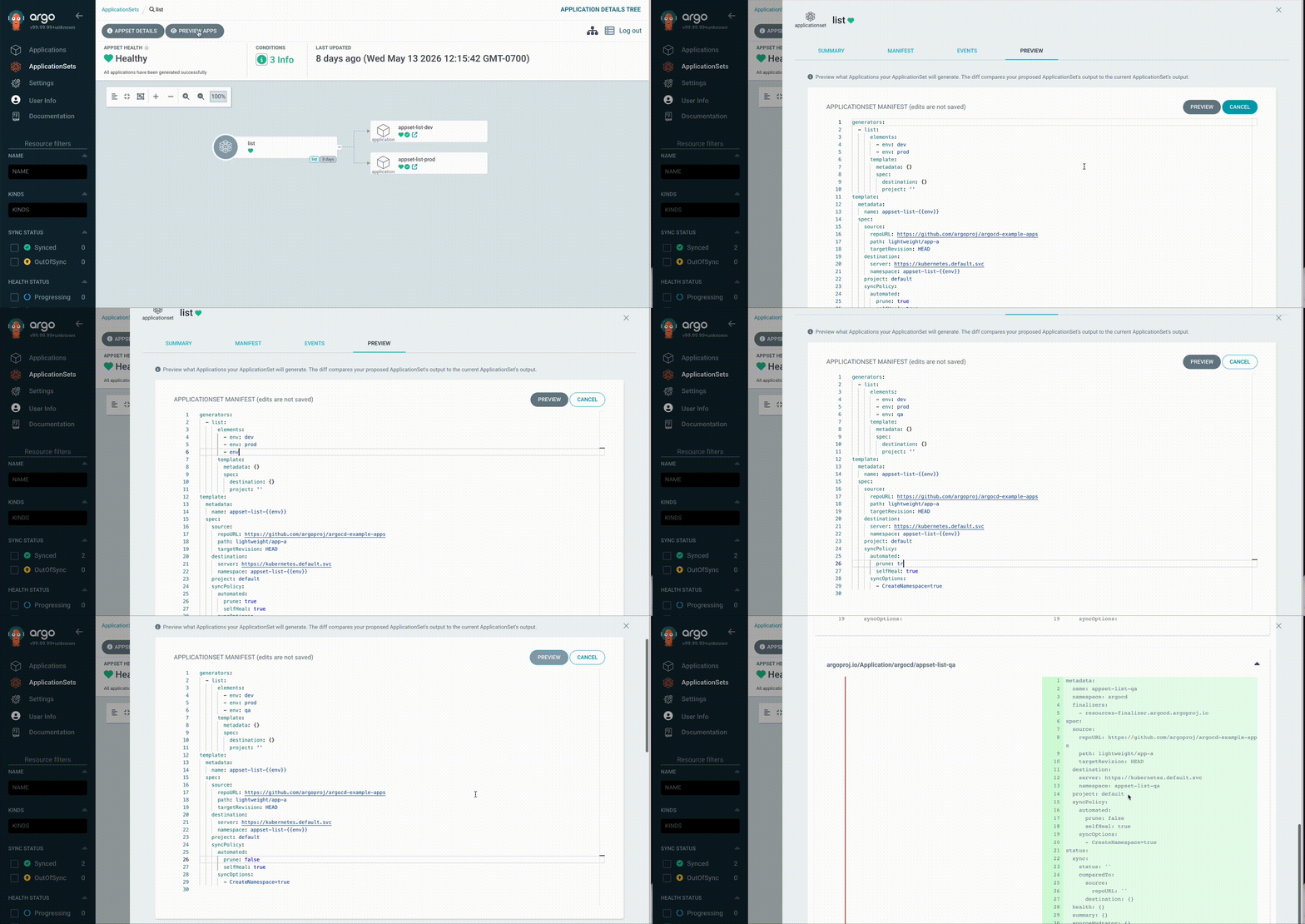
The result is rendered in three sub-tabs:
| Tab | Shows |
|---|---|
DIFF |
The default tab. A unified diff of each Application that would change. |
LIVE APPS |
The Applications generated by the ApplicationSet on the cluster. |
DESIRED APPS |
The Applications that would be generated if the proposed spec were applied. |
Each entry in DIFF represents one child Application and is categorized
as added (only in DESIRED APPS), removed (only in LIVE APPS), or
modified (present in both with field-level differences).
Editing the spec
Click Edit on the ApplicationSet manifest card to make the YAML editable. Hit Preview again and the diff regenerates against your edits. Click Cancel to discard local edits.
Important
Edits in the Preview tab are never saved. The tab is a sandbox; to
persist a change you must update the ApplicationSet through your normal
GitOps flow (or via kubectl apply / argocd appset create).
Permission-denied behavior
Generating a preview requires permission to create ApplicationSets in the target project. If you don't have it, the Preview tab returns a clear permission-denied message instead of a diff. For the exact RBAC requirement, see ApplicationSet Web UI: RBAC for Preview.
Changes to Applications generated by an ApplicationSet
For Applications that are generated by an ApplicationSet (i.e. that have
an ApplicationSet ownerReference), the Application UI surfaces the
parent ApplicationSet on the resource tree in two ways.
Owner badge
A small badge labeled with the parent's name appears on the Application node. Clicking it jumps directly to the parent's details page. For an app-of-apps child, the badge shows the parent Application's name and links to that Application. For an Application created from an ApplicationSet, it shows the ApplicationSet.

Show / hide the application's parent node
In the Application tree view preferences, a toggle — Show application's parent node — adds the Application's parent as a synthetic root node on the resource tree. This is useful when you want a single view that includes both the parent and the Application it produced.

When the toggle is on, the badge is hidden (since the parent is already rendered explicitly).
Per-Application preview from the app-of-appset pattern
When you use the app-of-ApplicationSets pattern — an Application whose resources include an ApplicationSet — the ApplicationSet node on the parent Application's tree includes a preview feature in its slide-out panel. Selecting it opens a panel with a Preview experience similar to the one described above, scoped to the changes that would land when you sync the parent Application.
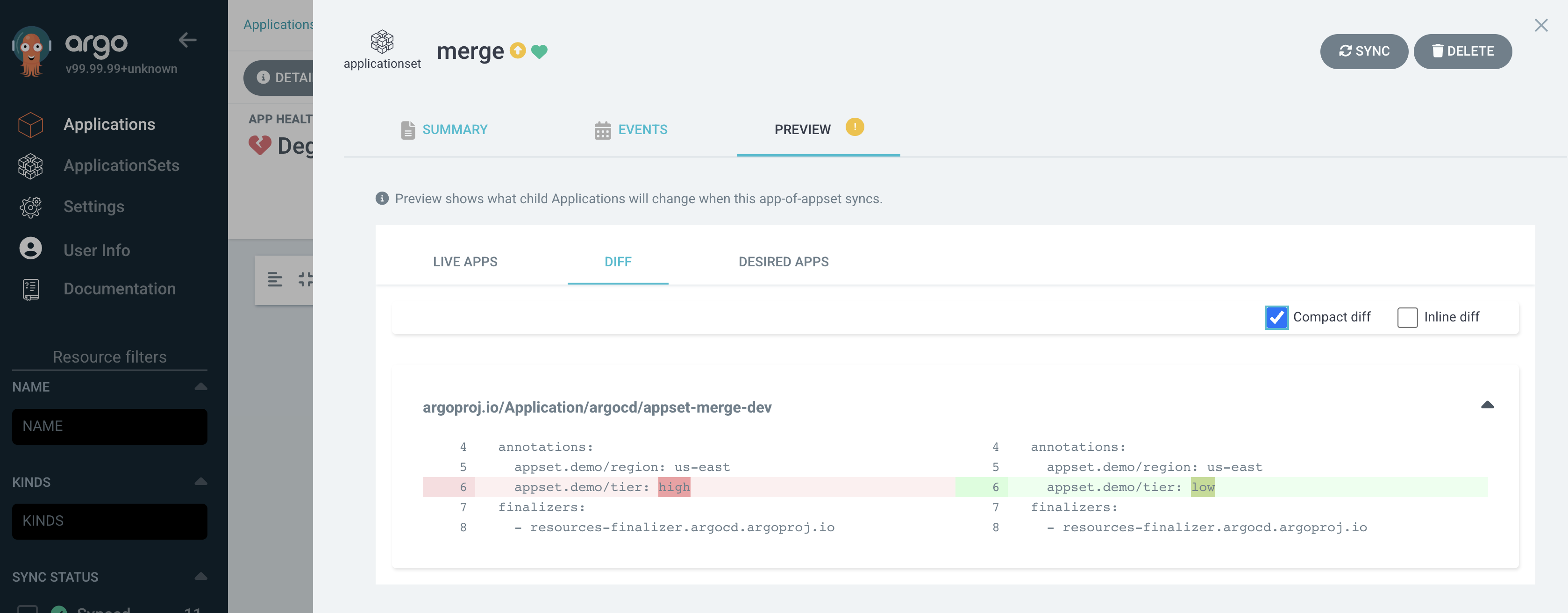
There are two important differences from the standalone Preview tab:
- Desired state comes from Git, not an editor. The proposed ApplicationSet is the target manifest tracked by the parent Application (i.e. what's in Git). There is no YAML editor in this panel.
- Only available when the ApplicationSet is OutOfSync. If the parent Application's ApplicationSet resource is already in sync, there is no diff to show — the panel renders a short status message instead.
This is the bridge between "I have a pending sync on my parent Application" and "show me which child Applications would change as a result."
Known limitations
- The Preview tab compares whole Application manifests. It does not recurse into the Kubernetes resources inside each child Application — for that, sync the child Application and use the existing Application diff view.
- Generators that depend on external systems (Git, SCM Provider, Pull Request, Cluster) are re-evaluated each time you click Preview. If the upstream system is slow or flaky, the preview will reflect that.
- The UI honors ApplicationSet RBAC. Users who cannot
createApplicationSets in the target project will not be able to render a preview, even if they cangetthe ApplicationSet.