Webhook Configuration
Overview
Argo CD polls Git/OCI/Helm repositories every three minutes to detect changes to the manifests. To eliminate this delay from polling, the API server can be configured to receive webhook events.
Git Webhooks
Argo CD supports Git webhook notifications from GitHub, GitLab, Bitbucket, Bitbucket Server, Azure DevOps and Gogs. The following explains how to configure a Git webhook for GitHub, but the same process should be applicable to other providers.
OCI Registry Webhooks
Argo CD also supports webhooks from OCI-compliant container registries to trigger application refreshes when new OCI artifacts are pushed. See Webhook Configuration for OCI-Compliant Registries for details.
Application Sets use a separate webhook configuration for generating applications. Webhook support for the Git Generator can be found here.
Note
The webhook handler does not differentiate between branch events and tag events where the branch and tag names are
the same. A hook event for a push to branch x will trigger a refresh for an app pointing at the same repo with
targetRevision: refs/tags/x.
1. Create The WebHook In The Git Provider
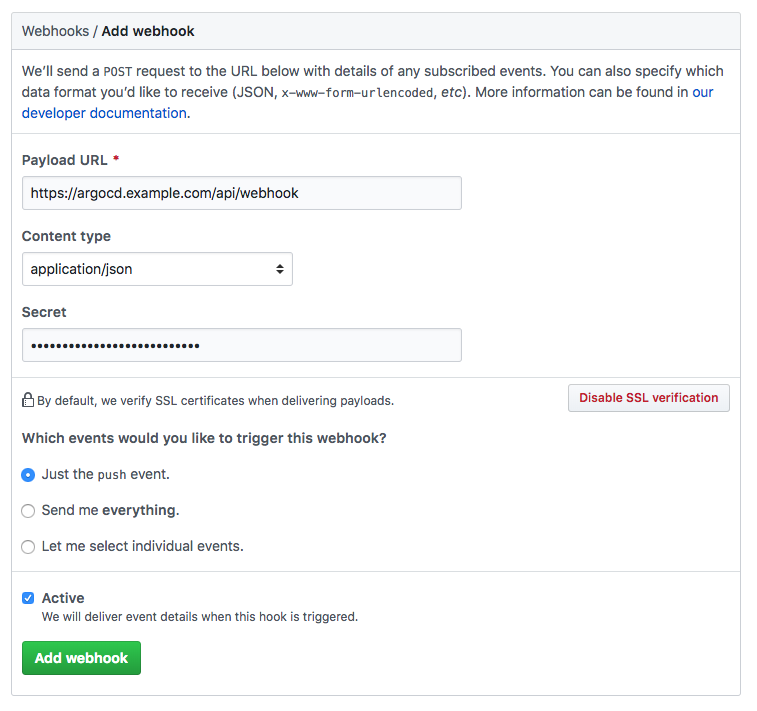
In your Git provider, navigate to the settings page where webhooks can be configured. The payload
URL configured in the Git provider should use the /api/webhook endpoint of your Argo CD instance
(e.g. https://argocd.example.com/api/webhook). If you wish to use a shared secret, input an
arbitrary value in the secret. This value will be used when configuring the webhook in the next step.
To prevent DDoS attacks with unauthenticated webhook events (the /api/webhook endpoint currently lacks rate limiting protection), it is recommended to limit the payload size. You can achieve this by configuring the argocd-cm ConfigMap with the webhook.maxPayloadSizeMB attribute. The default value is 50MB. The same setting also limits the payload size of the ApplicationSet webhook.
Github
Note
When creating the webhook in GitHub, the "Content type" needs to be set to "application/json". The default value "application/x-www-form-urlencoded" is not supported by the library used to handle the hooks
Azure DevOps
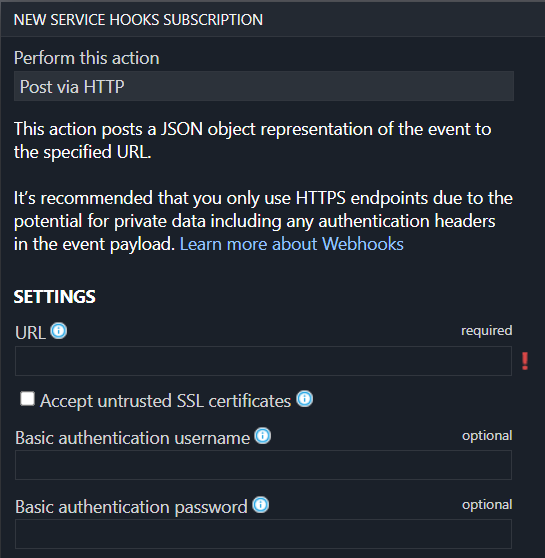
Azure DevOps optionally supports securing the webhook using basic authentication. To use it, specify the username and password in the webhook configuration and configure the same username/password in argocd-secret Kubernetes secret in
webhook.azuredevops.username and webhook.azuredevops.password keys.
2. Configure Argo CD With The WebHook Secret (Optional)
Configuring a webhook shared secret is optional, since Argo CD will still refresh applications related to the Git repository, even with unauthenticated webhook events. This is safe to do since the contents of webhook payloads are considered untrusted, and will only result in a refresh of the application (a process which already occurs at three-minute intervals). If Argo CD is publicly accessible, then configuring a webhook secret is recommended to prevent a DDoS attack.
In the argocd-secret Kubernetes secret, configure one of the following keys with the Git
provider's webhook secret configured in step 1.
| Provider | K8s Secret Key |
|---|---|
| GitHub | webhook.github.secret |
| GitLab | webhook.gitlab.secret |
| BitBucket | webhook.bitbucket.uuid |
| BitBucketServer | webhook.bitbucketserver.secret |
| Gogs | webhook.gogs.secret |
| Azure DevOps | webhook.azuredevops.username |
webhook.azuredevops.password |
|
| Harbor | webhook.harbor.secret |
Edit the Argo CD Kubernetes secret:
kubectl edit secret argocd-secret -n argocd
TIP: for ease of entering secrets, Kubernetes supports inputting secrets in the stringData field,
which saves you the trouble of base64 encoding the values and copying it to the data field.
Simply copy the shared webhook secret created in step 1, to the corresponding
GitHub/GitLab/BitBucket key under the stringData field:
apiVersion: v1
kind: Secret
metadata:
  name: argocd-secret
  namespace: argocd
type: Opaque
data:
...

stringData:
  # github webhook secret
  webhook.github.secret: shhhh! it's a GitHub secret

  # gitlab webhook secret
  webhook.gitlab.secret: shhhh! it's a GitLab secret

  # bitbucket webhook secret
  webhook.bitbucket.uuid: your-bitbucket-uuid

  # bitbucket server webhook secret
  webhook.bitbucketserver.secret: shhhh! it's a Bitbucket server secret

  # gogs server webhook secret
  webhook.gogs.secret: shhhh! it's a gogs server secret

  # azuredevops username and password
  webhook.azuredevops.username: admin
  webhook.azuredevops.password: secret-password
After saving, the changes should take effect automatically.
Alternative
If you want to store webhook data in another Kubernetes Secret, instead of argocd-secret. ArgoCD knows to check the keys under data in your Kubernetes Secret starts with $, then your Kubernetes Secret name and : (colon).
Syntax: $<k8s_secret_name>:<a_key_in_that_k8s_secret>
Note
Secret must have label app.kubernetes.io/part-of: argocd
For more information refer to the corresponding section in the User Management Documentation.
Special handling for BitBucket Cloud
BitBucket does not include the list of changed files in the webhook request body.
This prevents the Manifest Paths Annotation feature from working with repositories hosted on BitBucket Cloud.
BitBucket provides the diffstat API to determine the list of changed files between two commits.
To address the missing changed files list in the webhook, the Argo CD webhook handler makes an API callback to the originating server.
To prevent Server-side request forgery (SSRF) attacks, Argo CD server supports the callback mechanism only for encrypted webhook requests.
The incoming webhook must include X-Hook-UUID request header. The corresponding UUID must be provided as webhook.bitbucket.uuid in argocd-secret for verification.
The callback mechanism supports both public and private repositories on BitBucket Cloud.
For public repositories, the Argo CD webhook handler uses a no-auth client for the API callback.
For private repositories, the Argo CD webhook handler searches for a valid repository OAuth token for the HTTP/HTTPS URL.
The webhook handler uses this OAuth token to make the API request to the originating server.
If the Argo CD webhook handler cannot find a matching repository credential, the list of changed files would remain empty.
If errors occur during the callback, the list of changed files will be empty.
Special handling for BitBucket Server (Data Center)
BitBucket Server (Data Center) does not include the list of changed files in the webhook payload. This prevents the Manifest Paths Annotation feature from working correctly for monorepos hosted on BitBucket Server.
To enable changed-file detection, set the webhook secret in argocd-secret:
kubectl patch secret argocd-secret -n argocd \
  --type=merge \
  -p '{"stringData": {"webhook.bitbucketserver.secret": "<your-secret>"}}'
Requirements:
- The webhook must be authenticated:
webhook.bitbucketserver.secretmust be set inargocd-secret. Argo CD will only fetch changed files when the incoming webhook has been verified against the shared secret (required to prevent SSRF). - The repository must have credentials stored in Argo CD (basic auth or bearer token). If no matching credential is found, all apps pointing to the repository will be refreshed (safe fallback).
Note
If changed-file detection fails for any reason, Argo CD falls back to refreshing all apps pointing to the repository — the same behavior as when no secret is configured.
3. Webhook Configuration for OCI-Compliant Registries
In addition to Git webhooks, Argo CD supports webhooks from OCI-compliant container registries. This enables instant application refresh when new artifacts are pushed, eliminating the delay from polling.
Note
A registry webhook only refreshes matching Applications; the artifact is still resolved by the normal sync. The source must therefore point at a deployable OCI artifact like a Helm chart (pushed with helm push) or a bundle of Kubernetes manifests and not an arbitrary container image. Pointing a source at a plain image is a common mistake: the webhook fires and the refresh succeeds, but the subsequent sync fails to render manifests.
Warning
Argo CD rejects OCI artifacts with more than 10 layers. A normal Helm chart or manifest bundle has one or two layers, but a typical container image has many, so pointing a source at an image fails manifest generation with:
Failed to load target state: failed to generate manifest for source ... : rpc error: code = Unknown desc = expected no more than 10 oci layers, got 13
helm push mychart-1.0.0.tgz oci://docker.io/<namespace>) or a manifest bundle to that repository and point the Application's targetRevision at the chart/bundle tag. When a repository holds both image tags and chart tags, pin targetRevision to an exact chart tag. A semver constraint such as >=1.0.0 can otherwise resolve to a higher-numbered image tag and re-trigger this error.
GitHub Container Registry (GHCR)
Webhooks cannot be registered directly on a GHCR image repository. Instead, package events are delivered from the associated GitHub repository.
Note
If your GHCR image repository is not yet linked to a GitHub repository, see Connecting a repository to a package.
Configure the Webhook
- Go to your GitHub repository Settings → Webhooks → Add webhook
- Set Payload URL to
https://<argocd-server>/api/webhook - Set Content type to
application/json - Set Secret to a secure value
- Under Events, select Let me select individual events and enable Packages
Note
Only published events for container package types trigger a refresh. Other package types (npm, maven, etc.) and actions are ignored.
Warning
GitHub does not send package webhook events for artifacts with unknown media types. If your OCI artifact uses a custom or non-standard media type, the webhook will not be triggered. See GitHub documentation on supported package types.
Configure the Webhook Secret
GHCR webhooks use the same secret as GitHub Git webhooks (webhook.github.secret):
apiVersion: v1
kind: Secret
metadata:
  name: argocd-secret
  namespace: argocd
type: Opaque
stringData:
  webhook.github.secret: <your-webhook-secret>
Example Application
When a OCI artifact with a known media type is pushed to GHCR, Argo CD refreshes Applications with a matching repoURL and targetRevision. The source can be expressed in two ways.
A full-path OCI source, where repoURL points directly at the artifact:
apiVersion: argoproj.io/v1alpha1
kind: Application
metadata:
  name: my-app
spec:
  source:
    repoURL: oci://ghcr.io/myorg/mychart
    targetRevision: v1.0.0
    path: "." # either path or chart is required
  destination:
    server: https://kubernetes.default.svc
    namespace: default
A Helm-OCI source, where repoURL is the registry namespace and the chart name is given separately in chart (note: no oci:// scheme on repoURL for this form):
apiVersion: argoproj.io/v1alpha1
kind: Application
metadata:
  name: my-app
spec:
  source:
    repoURL: ghcr.io/myorg
    chart: mychart
    targetRevision: v1.0.0
  destination:
    server: https://kubernetes.default.svc
    namespace: default
Note
When a chart is set, Argo CD matches the webhook event against repoURL on its own as well as against repoURL with the chart appended (so ghcr.io/myorg + chart: mychart matches a push to ghcr.io/myorg/mychart). Either form matching is enough, so both examples above match the same push.
The targetRevision field supports exact tags and semver constraints:
| Constraint | Webhook triggers on push of |
|---|---|
1.0.0 |
Only 1.0.0 |
^1.2.0 |
>=1.2.0 and <2.0.0 (e.g., 1.2.1, 1.9.0) |
~1.2.0 |
>=1.2.0 and <1.3.0 (e.g., 1.2.1, 1.2.9) |
>=1.0.0 |
Any version >=1.0.0 |
URL Matching
Argo CD normalizes OCI repository URLs before comparison to ensure consistent matching:
For example, these repoURL values all match a webhook event for ghcr.io/myorg/myimage:
oci://ghcr.io/myorg/myimageoci://GHCR.IO/MyOrg/MyImageoci://ghcr.io/myorg/myimage/
Harbor
Harbor is a CNCF open-source OCI-compliant registry that supports sending webhook events when artifacts are pushed. Argo CD can be configured to receive these events and instantly refresh applications backed by OCI artifacts stored in Harbor.
Note
Harbor does not send a distinctive request header to identify webhook events, unlike GitHub which sends X-GitHub-Event.
Authentication is performed via a configurable Authorization header value that you set in both Harbor's webhook
configuration and in the ArgoCD secret. Configuring the secret (webhook.harbor.secret) is required for Harbor webhook support.
Warning
Harbor's Authorization header is a static bearer token, which is weaker than HMAC-based signing used by GitHub/GitLab. Unlike HMAC, a captured token can be replayed indefinitely and does not provide payload integrity guarantees. To reduce risk:
- Always use HTTPS between Harbor and Argo CD so the token cannot be intercepted in transit.
- Use a strong, randomly generated secret (e.g.
openssl rand -hex 32). - Rotate the secret periodically by updating both
webhook.harbor.secretinargocd-secretand the Auth Header in Harbor's webhook configuration. - Restrict network access to the
/api/webhookendpoint at the network/firewall level so only your Harbor instance can reach it.
Configure the Webhook Secret
In argocd-secret, set the Harbor webhook secret. This value must match the Auth Header you configure in Harbor's webhook settings:
apiVersion: v1
kind: Secret
metadata:
  name: argocd-secret
  namespace: argocd
type: Opaque
stringData:
  webhook.harbor.secret: <your-harbor-auth-header-value>
Configure the Webhook in Harbor
- Log in to the Harbor portal with project administrator privileges.
- Navigate to your Project → Webhooks → Add Webhook.
- Select notify type HTTP.
- Select payload format Default.
- Enable the Artifact pushed event type.
- Set Endpoint URL to
https://<argocd-server>/api/webhook. - Set Auth Header to the same value you configured in
webhook.harbor.secret. - Click Add to save the webhook.
Note
Argo CD only acts on PUSH_ARTIFACT events (artifact push). Other events such as PULL_ARTIFACT,
DELETE_ARTIFACT, and scan events are ignored. Push events for resources that have no tag
(digest-only pushes) are also ignored.
Example Application
When an OCI artifact is pushed to Harbor, Argo CD refreshes Applications with a matching repoURL:
apiVersion: argoproj.io/v1alpha1
kind: Application
metadata:
  name: my-app
spec:
  source:
    repoURL: oci://harbor.example.com/myproject
    targetRevision: v1.0.0
    chart: mychart
  destination:
    server: https://kubernetes.default.svc
    namespace: default
The targetRevision field supports exact tags as well as semver constraints (e.g. ^1.0.0, >=1.2.0). See the GHCR semver constraint table for details and examples.
Docker Hub
Docker Hub webhooks are configured per repository and notify Argo CD when a new image tag is pushed.
Note
Unlike GitHub, DockerHub neither signs webhook payloads nor sends a provider-specific header. Argo CD therefore identifies DockerHub requests by a type=dockerhub query parameter on the webhook URL, and authenticates them with a shared secret. The secret is read from the Authorization header if present, and otherwise from a secret query parameter. Configuring the secret (webhook.dockerhub.secret) is required for Docker Hub webhook support.
Configure the Webhook
Go through the DockerHub Webhooks docs to create a webhook for your repository, and set the url to https://<argocd-server>/api/webhook?type=dockerhub&secret=<your-webhook-secret>
Note
Docker Hub webhooks are scoped to a single repository, so add a webhook on every repository whose pushes should refresh an Application. Docker Hub also requires a publicly reachable HTTPS URL, so a cluster-internal or localhost address will not work, so expose argocd-server (e.g. via a tunnel) when testing locally.
Warning
Because Docker Hub cannot sign payloads, the shared secret is carried in the webhook URL rather than in a signature header. A captured secret can be replayed, and it does not provide payload integrity guarantees. To reduce risk:
- Always use HTTPS so the secret cannot be intercepted in transit, and be aware that a secret in the URL may be recorded by intermediate proxies or access logs. Moving it to a header (see below) avoids this.
- Use a strong, randomly generated secret (e.g.
openssl rand -hex 32). - Rotate the secret periodically by updating both
webhook.dockerhub.secretinargocd-secretand the webhook URL in Docker Hub. - Restrict network access to the
/api/webhookendpoint at the network/firewall level so only Docker Hub can reach it.
Passing the Secret in a Header Instead
Docker Hub only lets you configure a URL, so it cannot set request headers itself. If you front argocd-server with a proxy, ingress, or API gateway, you can have it strip the secret query parameter and forward the value in an Authorization header instead, keeping the secret out of URLs and access logs:
Authorization: <your-webhook-secret>
Argo CD prefers this header over the query parameter when both are present, and the header value is compared in constant time exactly like the query parameter. This matches how the Harbor webhook authenticates. Note that a request carrying an Authorization header is validated against that header alone — a wrong header value is rejected even if the query parameter is correct.
Configure the Webhook Secret
Configure the secret in the argocd-secret Kubernetes secret under webhook.dockerhub.secret. It must match the value used in the secret query parameter (or Authorization header) above:
apiVersion: v1
kind: Secret
metadata:
  name: argocd-secret
  namespace: argocd
type: Opaque
stringData:
  webhook.dockerhub.secret: <your-webhook-secret>
If no secret is configured, Docker Hub webhook support is disabled entirely and incoming Docker Hub events are rejected as an unknown webhook event, so the endpoint is never reachable without authentication. As with all webhooks, payloads are treated as untrusted and only ever result in a refresh of the matching application.
Example Application
When an image is pushed to Docker Hub, Argo CD refreshes Applications with a matching repoURL and targetRevision. As with GHCR, the source can be a full-path OCI source:
apiVersion: argoproj.io/v1alpha1
kind: Application
metadata:
  name: my-app
spec:
  source:
    repoURL: oci://docker.io/myorg/mychart
    targetRevision: v1.0.0
    path: "." # either path or chart is required
  destination:
    server: https://kubernetes.default.svc
    namespace: default
or a Helm-OCI source, where the chart name is given separately in chart (no oci:// scheme on repoURL):
apiVersion: argoproj.io/v1alpha1
kind: Application
metadata:
  name: my-app
spec:
  source:
    repoURL: docker.io/myorg
    chart: mychart
    targetRevision: v1.0.0
  destination:
    server: https://kubernetes.default.svc
    namespace: default
As with GHCR, targetRevision supports exact tags and semver constraints, and a chart field is appended to repoURL before matching.
Note
The repoURL host must be docker.io. Official images (pushed without a namespace) are matched under the implicit library/ namespace, e.g. a push to nginx matches oci://docker.io/library/nginx.
Application Annotations Used by Webhooks
A webhook event triggers a refresh by setting the argocd.argoproj.io/refresh annotation on each matching
Application (and, for Applications using the source hydrator, the
argocd.argoproj.io/hydrate annotation as well). The application controller removes these annotations once it
has finished processing the refresh. See Annotations and Labels for
the full list of values these annotations can take.
Each refresh request also sets a companion argocd.argoproj.io/refresh-timestamp (and, for hydration,
argocd.argoproj.io/hydrate-timestamp) annotation to a unique timestamp. Before removing the refresh/hydrate
annotation, the controller checks that this timestamp still matches the value it observed when the refresh
started. If another webhook event (or any other refresh trigger) arrived for the same Application while the
first refresh was still being processed, the timestamp will have changed, so the controller leaves the
annotations in place and processes the new request instead of dropping it. Without this check, a refresh
request that arrives while a previous one for the same Application is still being reconciled could otherwise be
silently lost until the next periodic poll or a manual refresh.