Overview
Once installed Argo CD has one built-in admin user that has full access to the system. It is recommended to use admin user only
for initial configuration and then switch to local users or configure SSO integration.
Local users/accounts
The local users/accounts feature serves two main use-cases:
- Auth tokens for Argo CD management automation. It is possible to configure an API account with limited permissions and generate an authentication token. Such token can be used to automatically create applications, projects etc.
- Additional users for a very small team where use of SSO integration might be considered an overkill. The local users don't provide advanced features such as groups, login history etc. So if you need such features it is strongly recommended to use SSO.
Note
When you create local users, each of those users will need additional RBAC rules set up, otherwise they will fall back to the default policy specified by policy.default field of the argocd-rbac-cm ConfigMap.
The maximum length of a local account's username is 32.
Create new user
New users should be defined in argocd-cm ConfigMap:
apiVersion: v1
kind: ConfigMap
metadata:
  name: argocd-cm
  namespace: argocd
  labels:
    app.kubernetes.io/name: argocd-cm
    app.kubernetes.io/part-of: argocd
data:
  # add an additional local user with apiKey and login capabilities
  #   apiKey - allows generating API keys
  #   login - allows to login using UI
  accounts.alice: apiKey, login
  # disables user. User is enabled by default
  accounts.alice.enabled: "false"
Each user might have two capabilities:
- apiKey - allows generating authentication tokens for API access
- login - allows to login using UI
Delete user
In order to delete a user, you must remove the corresponding entry defined in the argocd-cm ConfigMap:
Example:
kubectl patch -n argocd cm argocd-cm --type='json' -p='[{"op": "remove", "path": "/data/accounts.alice"}]'
It is recommended to also remove the password entry in the argocd-secret Secret:
Example:
kubectl patch -n argocd secrets argocd-secret --type='json' -p='[{"op": "remove", "path": "/data/accounts.alice.password"}]'
Disable admin user
As soon as additional users are created it is recommended to disable admin user:
apiVersion: v1
kind: ConfigMap
metadata:
  name: argocd-cm
  namespace: argocd
  labels:
    app.kubernetes.io/name: argocd-cm
    app.kubernetes.io/part-of: argocd
data:
  admin.enabled: "false"
Manage users
The Argo CD CLI provides set of commands to set user password and generate tokens.
-
Get full users list
argocd account list -
Get specific user details
argocd account get --account <username> -
Set user password
# if you are managing users as the admin user, <current-user-password> should be the current admin password. argocd account update-password \ --account <name> \ --current-password <current-user-password> \ --new-password <new-user-password> -
Generate auth token
# if flag --account is omitted then Argo CD generates token for current user
argocd account generate-token --account <username>
Failed logins rate limiting
Argo CD rejects login attempts after too many failed in order to prevent password brute-forcing. The following environments variables are available to control throttling settings:
-
ARGOCD_SESSION_FAILURE_MAX_FAIL_COUNT: Maximum number of failed logins before Argo CD starts rejecting login attempts. Default: 5. -
ARGOCD_SESSION_FAILURE_WINDOW_SECONDS: Number of seconds for the failure window. Default: 300 (5 minutes). If this is set to 0, the failure window is disabled and the login attempts gets rejected after 10 consecutive logon failures, regardless of the time frame they happened. -
ARGOCD_SESSION_MAX_CACHE_SIZE: Maximum number of entries allowed in the cache. Default: 1000 -
ARGOCD_MAX_CONCURRENT_LOGIN_REQUESTS_COUNT: Limits max number of concurrent login requests. If set to 0 then limit is disabled. Default: 50.
Revoked token resync
Logging out of the UI revokes that session's token. Revocations are broadcast to all argocd-server
replicas over Redis pub/sub immediately, and each replica additionally reloads the full set of revoked
tokens once at startup and then on a timer. That reload performs a full-keyspace SCAN, so its cost grows
with the total size of the Redis keyspace — normally dominated by the manifest cache rather than by revoked
tokens — and with the number of argocd-server replicas.
ARGOCD_SESSION_REVOKED_TOKEN_RESYNC_DURATION: How often eachargocd-serverreplica reloads the full set of revoked tokens from Redis. Accepts any Go duration string (for example15m), between 15s and 1h. Values outside that range, or that cannot be parsed, are ignored in favour of the default. Default: 5m.
Because normal revocation latency is set by pub/sub and freshly started replicas load the set before
serving, the timer is only a backstop against a dropped pub/sub message. Shortening it narrows the window
in which a replica that dropped a message may still accept a revoked token, at a proportional increase in
Redis CPU spent on SCAN; lengthening it does the reverse, and is worth doing on installations with a
large Redis keyspace and few token revocations.
SSO
There are two ways that SSO can be configured:
-
Bundled Dex OIDC provider - use this option if your current provider does not support OIDC (e.g. SAML, LDAP) or if you wish to leverage any of Dex's connector features (e.g. the ability to map GitHub organizations and teams to OIDC groups claims). Dex also supports OIDC directly and can fetch user information from the identity provider when the groups cannot be included in the IDToken.
-
Existing OIDC provider - use this if you already have an OIDC provider which you are using (e.g. Okta, OneLogin, Auth0, Microsoft, Keycloak, Google (G Suite)), where you manage your users, groups, and memberships.
Dex
Argo CD embeds and bundles Dex as part of its installation, for the
purpose of delegating authentication to an external identity provider. Multiple types of identity
providers are supported (OIDC, SAML, LDAP, GitHub, etc...). SSO configuration of Argo CD requires
editing the argocd-cm ConfigMap with
Dex connector settings.
This document describes how to configure Argo CD SSO using GitHub (OAuth2) as an example, but the steps should be similar for other identity providers.
1. Register the application in the identity provider
In GitHub, register a new application. The callback address should be the /api/dex/callback
endpoint of your Argo CD URL (e.g. https://argocd.example.com/api/dex/callback).
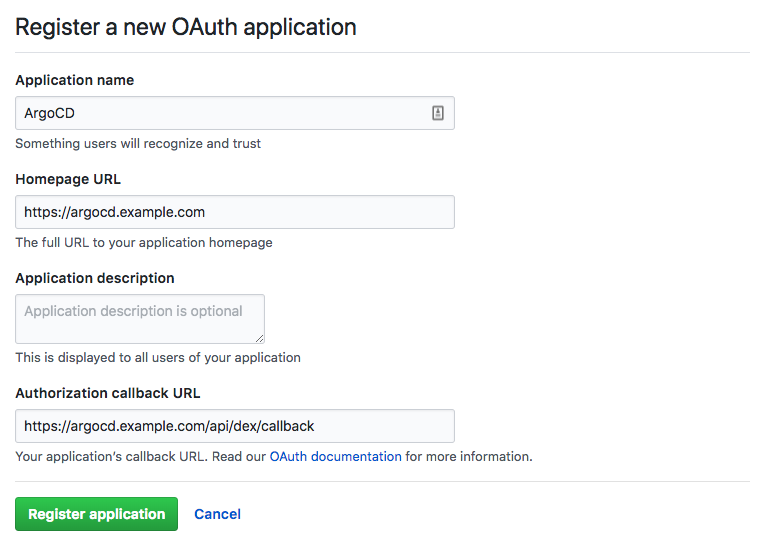
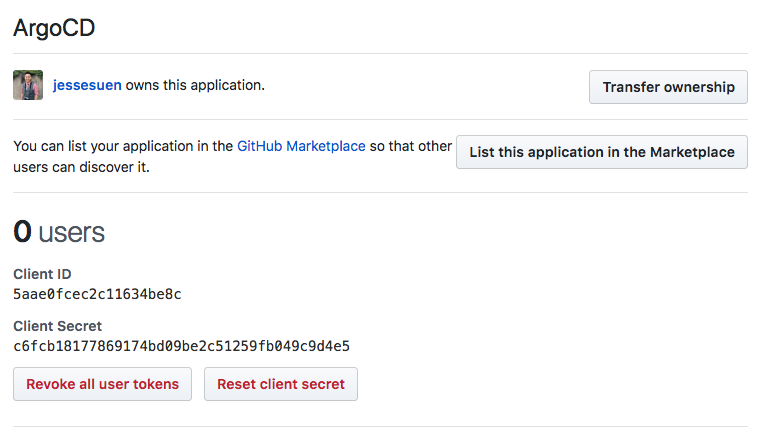
After registering the app, you will receive an OAuth2 client ID and secret. These values will be inputted into the Argo CD configmap.
2. Configure Argo CD for SSO
Edit the argocd-cm configmap:
kubectl edit configmap argocd-cm -n argocd
- In the
urlkey, input the base URL of Argo CD. In this example, it ishttps://argocd.example.com - (Optional): If Argo CD should be accessible via multiple base URLs you may
specify any additional base URLs via the
additionalUrlskey. When Argo CD is served under a non-root path, each entry must include that path. For example, with--rootpath=/argocd, usehttps://anotherhost.org/argocd, nothttps://anotherhost.org. Omitting the path causes SSO callback URLs to omit it as well. Requests must match the configured host and either the base path or a child path; for example,/argomatches/argo/loginbut not/argocd/login. - In the
dex.configkey, add thegithubconnector to theconnectorssub field. See Dex's GitHub connector documentation for explanation of the fields. A minimal config should populate the clientID, clientSecret generated in Step 1. - You will very likely want to restrict logins to one or more GitHub organization. In the
connectors.config.orgslist, add one or more GitHub organizations. Any member of the org will then be able to login to Argo CD to perform management tasks.
data:
  url: https://argocd.example.com

  dex.config: |
    connectors:
      # GitHub example
      - type: github
        id: github
        name: GitHub
        config:
          clientID: aabbccddeeff00112233
          clientSecret: $dex.github.clientSecret # Alternatively $<some_K8S_secret>:dex.github.clientSecret
          orgs:
          - name: your-github-org

      # GitHub enterprise example
      - type: github
        id: acme-github
        name: Acme GitHub
        config:
          hostName: github.acme.example.com
          clientID: abcdefghijklmnopqrst
          clientSecret: $dex.acme.clientSecret  # Alternatively $<some_K8S_secret>:dex.acme.clientSecret
          orgs:
          - name: your-github-org
After saving, the changes should take effect automatically.
NOTES:
- There is no need to set
redirectURIin theconnectors.configas shown in the dex documentation. Argo CD will automatically use the correctredirectURIfor any OAuth2 connectors, to match the correct external callback URL (e.g.https://argocd.example.com/api/dex/callback) - By default,
Secretkeys such asdex.acme.clientSecretwill be looked up inargocd-secret. If you want to use another secret, (some_K8S_secretin the example above), it must have the labelapp.kubernetes.io/part-of: argocd.
OIDC Configuration with DEX
Dex can be used for OIDC authentication instead of ArgoCD directly. This provides a separate set of
features such as fetching information from the UserInfo endpoint and
federated tokens
Configuration:
- In the
argocd-cmConfigMap add theOIDCconnector to theconnectorssub field insidedex.config. See Dex's OIDC connect documentation to see what other configuration options might be useful. We're going to be using a minimal configuration here. - The issuer URL should be where Dex talks to the OIDC provider. There would normally be a
.well-known/openid-configurationunder this URL which has information about what the provider supports. e.g. https://accounts.google.com/.well-known/openid-configuration
data:
  url: "https://argocd.example.com"
  dex.config: |
    connectors:
      # OIDC
      - type: oidc
        id: oidc
        name: OIDC
        config:
          issuer: https://example-OIDC-provider.example.com
          clientID: aaaabbbbccccddddeee
          clientSecret: $dex.oidc.clientSecret
Note
Argo CD's OIDC token refresh (see refreshTokenThreshold in Existing OIDC Provider)
does not apply to Dex's embedded web login flow. Once a Dex-issued ID token expires, the user
must log in again, regardless of refreshTokenThreshold being set.
Requesting additional ID token claims
By default Dex only retrieves the profile and email scopes. In order to retrieve more claims you
can add them under the scopes entry in the Dex configuration. To enable group claims through Dex,
insecureEnableGroups also needs to be enabled. Group information is currently only refreshed at authentication
time and support to refresh group information more dynamically can be tracked here: dexidp/dex#1065.
data:
  url: "https://argocd.example.com"
  dex.config: |
    connectors:
      # OIDC
      - type: oidc
        id: oidc
        name: OIDC
        config:
          issuer: https://example-OIDC-provider.example.com
          clientID: aaaabbbbccccddddeee
          clientSecret: $dex.oidc.clientSecret
          insecureEnableGroups: true
          scopes:
          - profile
          - email
          - groups
Warning
Because group information is only refreshed at authentication time just adding or removing an account from a group will not change a user's membership until they reauthenticate. Depending on your organization's needs this could be a security risk and could be mitigated by changing the authentication token's lifetime.
Retrieving claims that are not in the token
When an Idp does not or cannot support certain claims in an IDToken they can be retrieved separately using
the UserInfo endpoint. Dex supports this functionality using the getUserInfo endpoint. One of the most
common claims that is not supported in the IDToken is the groups claim and both getUserInfo and insecureEnableGroups
must be set to true.
data:
  url: "https://argocd.example.com"
  dex.config: |
    connectors:
      # OIDC
      - type: oidc
        id: oidc
        name: OIDC
        config:
          issuer: https://example-OIDC-provider.example.com
          clientID: aaaabbbbccccddddeee
          clientSecret: $dex.oidc.clientSecret
          insecureEnableGroups: true
          scopes:
          - profile
          - email
          - groups
          getUserInfo: true
Force redirect to selected Dex connector (Alpha)
Dex login page displays a list of available connectors if more than one is configured.
For example, with an Okta connector for human users and a GitHub Actions connector for machines (OIDC token exchange), the login screen shows both as clickable options. However, clicking the GitHub Actions connector is not useful for human users and leads to a failed login page.
To configure Argo CD to redirect users to a specific Dex connector, add the dex.auth.connectorId key to the argocd-cm ConfigMap with the chosen connector ID.
This applies to both the web UI login button and the argocd login --sso CLI flow. The value must match the id of a connector defined in dex.config; an unknown ID is ignored.
data:
  url: "https://argocd.example.com"
  dex.auth.connectorId: okta
  dex.config: |
    connectors:
      - type: oidc
        id: okta
        name: Okta
        config:
          issuer: https://org-ID.okta.com
          clientID: aaaabbbbccccddddeee
          clientSecret: $dex.okta.clientSecret
          insecureSkipEmailVerified: true
          insecureEnableGroups: true
          scopes: [openid, profile, email, groups]
      - type: oidc
        id: github-actions
        name: GitHub Actions
        config:
          issuer: https://token.actions.githubusercontent.com
          userNameKey: sub
          insecureSkipEmailVerified: true
          claimMapping:
            email: sub
Existing OIDC Provider
To configure Argo CD to delegate authentication to your existing OIDC provider, add the OAuth2
configuration to the argocd-cm ConfigMap under the oidc.config key:
data:
  url: https://argocd.example.com

  oidc.config: |
    name: Okta
    issuer: https://dev-123456.oktapreview.com
    clientID: aaaabbbbccccddddeee
    clientSecret: $oidc.okta.clientSecret

    # Optional list of allowed aud claims. If omitted or empty, defaults to the clientID value above (and the
    # cliClientID, if that is also specified). If you specify a list and want the clientID to be allowed, you must
    # explicitly include it in the list.
    # Token verification will pass if any of the token's audiences matches any of the audiences in this list.
    allowedAudiences:
    - aaaabbbbccccddddeee
    - qqqqwwwweeeerrrrttt

    # Optional. If false, tokens without an audience will always fail validation. If true, tokens without an audience
    # will always pass validation.
    # Defaults to true for Argo CD < 2.6.0. Defaults to false for Argo CD >= 2.6.0.
    skipAudienceCheckWhenTokenHasNoAudience: true

    # Optional set of OIDC scopes to request. If omitted, defaults to: ["openid", "profile", "email", "groups"]
    requestedScopes: ["openid", "profile", "email", "groups"]

    # Optional set of OIDC claims to request on the ID token.
    requestedIDTokenClaims: {"groups": {"essential": true}}

    # Some OIDC providers require a separate clientID for different callback URLs.
    # For example, if configuring Argo CD with self-hosted Dex, you will need a separate client ID
    # for the 'localhost' (CLI) client to Dex. This field is optional. If omitted, the CLI will
    # use the same clientID as the Argo CD server
    cliClientID: vvvvwwwwxxxxyyyyzzzz

    # PKCE is an OIDC extension to prevent authorization code interception attacks.
    # Make sure the identity provider supports it and that it is activated for Argo CD OIDC client.
    # Default is false.
    enablePKCEAuthentication: true

    # Optional. Argo CD uses this threshold to refresh an OIDC ID token before it expires, using the
    # cached refresh token, so the session isn't interrupted. Must be shorter than the ID
    # token's lifetime, or a new token will be requested on every request.
    # Default is 0s.
    refreshTokenThreshold: 30s
Note
The callback address should be the /auth/callback endpoint of your Argo CD URL (e.g. https://argocd.example.com/auth/callback).
Requesting additional ID token claims
Not all OIDC providers support a special groups scope. E.g. Okta, OneLogin and Microsoft do support a special
groups scope and will return group membership with the default requestedScopes.
Other OIDC providers might be able to return a claim with group membership if explicitly requested to do so.
Individual claims can be requested with requestedIDTokenClaims, see
OpenID Connect Claims Parameter
for details. The Argo CD configuration for claims is as follows:
  oidc.config: |
    requestedIDTokenClaims:
      email:
        essential: true
      groups:
        essential: true
        value: org:myorg
      acr:
        essential: true
        values:
        - urn:mace:incommon:iap:silver
        - urn:mace:incommon:iap:bronze
For a simple case this can be:
  oidc.config: |
    requestedIDTokenClaims: {"groups": {"essential": true}}
Retrieving group claims when not in the token
Some OIDC providers don't return the group information for a user in the ID token, even if explicitly requested using the requestedIDTokenClaims setting (Okta for example). They instead provide the groups on the user info endpoint. With the following config, Argo CD queries the user info endpoint during login for groups information of a user:
oidc.config: |
    enableUserInfoGroups: true
    userInfoPath: /userinfo
    userInfoURL: "https://users.example.com"
    userInfoCacheExpiration: "5m"
Note: If you omit the userInfoCacheExpiration setting or if it's greater than the expiration of the ID token, the argocd-server will cache group information as long as the ID token is valid!
Configuring a custom logout URL for your OIDC provider
Optionally, if your OIDC provider exposes a logout API and you wish to configure a custom logout URL for the purposes of invalidating any active session post logout, you can do so by specifying it as follows:
  oidc.config: |
    name: example-OIDC-provider
    issuer: https://example-OIDC-provider.example.com
    clientID: xxxxxxxxx
    clientSecret: xxxxxxxxx
    requestedScopes: ["openid", "profile", "email", "groups"]
    requestedIDTokenClaims: {"groups": {"essential": true}}
    logoutURL: https://example-OIDC-provider.example.com/logout?id_token_hint={{token}}
...
    logoutURL: https://example-OIDC-provider.example.com/logout?id_token_hint={{token}}&post_logout_redirect_uri={{logoutRedirectURL}}
You are not required to specify a logoutRedirectURL as this is automatically generated by ArgoCD as your base ArgoCD url + Rootpath
Note
The post logout redirect URI may need to be whitelisted against your OIDC provider's client settings for ArgoCD.
Token Revocation and Session Management
Argo CD implements server-side token revocation to enhance security when users log out. This is particularly important for SSO configurations using Dex or other OIDC providers.
How Token Revocation Works
When a user logs out (either via the UI or CLI using argocd logout), Argo CD:
- Invalidates the token on the server: The token is added to a revocation list stored in Redis
- Removes the token locally: The token is removed from the local configuration
- Redirects to OIDC provider (if configured): The user is redirected to the OIDC provider's logout URL to terminate the SSO session
Revoked tokens cannot be used for API calls, even if they haven't expired yet. This prevents: - Unauthorized access after logout - Token reuse if a token is compromised - Security gaps with Dex SSO where tokens are not automatically invalidated
Graceful Degradation
The argocd logout command will gracefully handle scenarios where the server is unreachable:
$ argocd logout my-argocd-server
WARN[0000] Failed to invalidate token on server: connection refused. Proceeding with local logout.
Logged out from 'my-argocd-server'
This allows users to logout locally even if the server is down, though the token will not be revoked server-side until it expires naturally.
Security Best Practices
1.Use short-lived tokens: Configure reasonable token expiration times in the OIDC provider to limit the window of exposure
2.Enable logout URLs: Configure logoutURL in oidc.config for your OIDC provider to ensure SSO sessions are also terminated
3.Monitor token usage: Use Argo CD's audit logging to track token creation and revocation events
Configuring a custom root CA certificate for communicating with the OIDC provider
If your OIDC provider is setup with a certificate which is not signed by one of the well known certificate authorities
you can provide a custom certificate which will be used in verifying the OIDC provider's TLS certificate when
communicating with it.
Add a rootCA to your oidc.config which contains the PEM encoded root certificate:
  oidc.config: |
    ...
    rootCA: |
      -----BEGIN CERTIFICATE-----
      ... encoded certificate data here ...
      -----END CERTIFICATE-----
CI/CD Pipeline Authentication
CI/CD pipelines run without a browser, so the usual argocd login --sso flow doesn't apply.
The following patterns described in this section all work headlessly, and you can choose the one that suits your needs.
However, before going further — if your pipeline is creating or updating Applications or AppProjects, committing those manifests to Git and letting Argo CD reconcile them is almost always the better path. You don't need to manage credentials, rotate tokens or perform other security operations.
The patterns discussed in the next sections cover the cases where a direct argocd CLI call is unavoidable: triggering a sync, querying live status, or managing tokens.
Project role tokens
AppProjects can issue JWTs scoped to a role's policies. This is useful when you want CI access limited to a specific project without creating a cluster-level account.
Add a role to your AppProject:
spec:
  roles:
    - name: ci-deploy
      description: CI pipeline deployment access
      policies:
        - p, proj:my-project:ci-deploy, applications, sync, my-project/*, allow
        - p, proj:my-project:ci-deploy, applications, get, my-project/*, allow
Then generate a token for it:
argocd proj role create-token my-project ci-deploy --expires-in 24h
Store the token as ARGOCD_AUTH_TOKEN in your CI secrets. Use argocd proj role delete-token to revoke it.
Warning
Avoid --expires-in 0s (no expiry) unless your pipeline explicitly rotates tokens. A
non-expiring token that leaks — via a CI log, a cached artifact, or an accidentally
committed secret — remains valid indefinitely with no automatic recovery.
Short-lived tokens require rotation. Rotating a project role token requires an existing
valid Argo CD credential to call argocd proj role create-token. If your pipeline runs
infrequently, consider using Dex Token Exchange instead — the CI platform's own identity
token is always fresh and needs no rotation.
Note
Project role tokens are scoped to the project's own policies. They cannot be granted cluster-level or cross-project permissions.
Local user API token
Add a local account with the apiKey capability in argocd-cm:
data:
  accounts.ci-bot: apiKey
Generate a token:
argocd account generate-token --account ci-bot --expires-in 24h
Set the output as ARGOCD_AUTH_TOKEN and configure the account's RBAC in argocd-rbac-cm. Use argocd account delete-token to revoke individual tokens.
Warning
Without --expires-in, the generated token never expires. Prefer short-lived tokens and
rotate them from your CI system rather than relying on manual revocation.
Dex Token Exchange
If your CI platform issues OIDC tokens (GitHub Actions, GitLab CI, Microsoft Entra ID, etc.), Dex can exchange them for Argo CD tokens without any browser interaction. This uses the OAuth 2.0 Token Exchange grant (RFC 8693).
Configure Dex
Enable the token exchange grant type and add a connector for your CI provider in dex.config inside argocd-cm:
dex.config: |
  oauth2:
    grantTypes:
      - authorization_code
      - refresh_token
      - urn:ietf:params:oauth:grant-type:token-exchange
  connectors:
    - type: oidc
      id: <your-ci-connector-id>
      name: <Your CI Provider>
      config:
        issuer: <issuer-url-of-ci-identity-provider>
        scopes: [openid]
        userNameKey: sub
        insecureSkipEmailVerified: true
Warning
insecureSkipEmailVerified: true skips email verification for every identity on that
connector, not just pipeline jobs. Always use a dedicated connector for CI providers —
never share a connector between CI pipelines and human users.
Exchange the token
In your pipeline, exchange your CI platform's identity token for an Argo CD token:
DEX_TOKEN=$(curl -sSf "https://${ARGOCD_SERVER}/api/dex/token" \
  --user "argo-cd-cli:" \
  --data-urlencode "connector_id=<your-ci-connector-id>" \
  --data-urlencode "grant_type=urn:ietf:params:oauth:grant-type:token-exchange" \
  --data-urlencode "scope=openid email profile federated:id" \
  --data-urlencode "requested_token_type=urn:ietf:params:oauth:token-type:access_token" \
  --data-urlencode "subject_token=${CI_IDENTITY_TOKEN}" \
  --data-urlencode "subject_token_type=urn:ietf:params:oauth:token-type:id_token" \
  | jq -r .access_token)

# mask the token in CI logs before use
export ARGOCD_AUTH_TOKEN="$DEX_TOKEN"
Replace CI_IDENTITY_TOKEN with the identity token your CI platform issues and connector_id with the id from your Dex connector config. Mask the token before it reaches your CI logs — for example, echo "::add-mask::$DEX_TOKEN" in GitHub Actions or the equivalent for your platform.
Configure RBAC
In Argo CD v3.0 and later, the RBAC subject is derived from federated_claims.user_id in
the exchanged token, not the sub claim. For an OIDC connector configured with
userNameKey: sub (as shown above), this equals the raw sub value from your CI
platform's own identity token — the connector ID is not appended.
To find the exact value for your setup, run argocd account get-user-info after a
successful exchange and copy the Username field. Then add it to argocd-rbac-cm:
apiVersion: v1
kind: ConfigMap
metadata:
  name: argocd-rbac-cm
  namespace: argocd
data:
  policy.csv: |
    p, repo:myorg/myrepo:ref:refs/heads/main, applications, sync, my-project/*, allow
    p, repo:myorg/myrepo:ref:refs/heads/main, applications, get, my-project/*, allow
If you manage Argo CD with Helm, set the same policies under configs.rbac.policy.csv in
your values file instead.
For full worked examples see GitHub Actions and GitLab CI.
Warning
The RBAC subject must be the full, exact federated_claims.user_id value — not a partial
string or the connector name. The Dex token endpoint is publicly reachable and uses a
public client, so security depends entirely on your RBAC policies being specific. An overly
broad subject could grant access to any identity from that issuer, including pipelines in
other organizations' repositories.
Warning
When requesting CI_IDENTITY_TOKEN, set its audience (aud) to your Argo CD URL (e.g.
https://argocd.example.com). If the token carries a broad or shared audience, Dex will
accept any token carrying that audience, regardless of which service it was issued for —
the same confused deputy risk as with external OIDC. Most CI platforms let you specify
the audience when requesting an identity token; always scope it to Argo CD specifically.
Note
Token exchange requires Dex. It does not work when Argo CD is configured with an external
OIDC provider directly via oidc.config without Dex.
External OIDC ID token
If Argo CD uses an external OIDC provider via oidc.config (no Dex), and your CI platform can get an ID token from that same provider, you can pass it directly as ARGOCD_AUTH_TOKEN. Argo CD verifies it against the provider's public keys.
This covers several common setups:
- Azure — CI running with Azure Workload Identity or a managed identity, where the same Azure AD tenant is Argo CD's OIDC provider.
- Kubernetes pods — a pod's projected ServiceAccount token, when the cluster's SA token issuer matches Argo CD's configured OIDC issuer.
- Okta / Keycloak — a machine client using the client credentials grant to get an ID token directly from the IdP.
Warning
Set allowedAudiences explicitly in oidc.config to a value unique to your Argo CD
instance. If it is too broad — or shared with other services — a token issued for a
different service can be used to authenticate to Argo CD. This is a confused deputy
attack: the attacker needs only to compromise any other service that shares the audience.
Warning
Avoid the Resource Owner Password Credentials (ROPC) grant. It sends a username and password directly from your pipeline to the IdP, bypasses MFA, and is deprecated in OAuth 2.1. Use the client credentials grant or Dex Token Exchange instead.
Kubernetes-direct (--core mode)
argocd login --core skips Argo CD's own authentication entirely. It starts a local in-process server and enforces access through Kubernetes RBAC on your kubeconfig or in-cluster service account. No ARGOCD_AUTH_TOKEN required.
# in-cluster
argocd login --core

# with a specific kubeconfig context
argocd login --core --kube-context my-cluster
argocd app sync guestbook --core
argocd app wait guestbook --core
The kubeconfig user or service account needs read/write access to Argo CD CRDs (applications.argoproj.io, appprojects.argoproj.io) in the Argo CD namespace.
Warning
--core mode bypasses Argo CD's authentication and its RBAC policy enforcer (the
p, <subject>, applications, … rules in argocd-rbac-cm). AppProject source and
destination validation still runs in the application controller at reconcile time — an
Application that violates its project's sourceRepos or destinations will surface an
InvalidSpecError condition rather than sync. The real escalation path is different: a
--core identity with write access to appprojects.argoproj.io can mutate the AppProject
itself — widening destinations, relaxing sourceRepos, or adding a permissive role —
and then deploy anywhere. Grant this access only to highly trusted identities and prefer
project role tokens or local user tokens for normal CI use.
Additionally, actions taken in --core mode are not attributed to a named Argo CD user
in the audit log, which may be a compliance concern in regulated environments.
Note
Some server-side operations — such as generating project tokens or managing accounts — are
not available in --core mode.
SSO Further Reading
Sensitive Data and SSO Client Secrets
argocd-secret can be used to store sensitive data which can be referenced by ArgoCD. Values starting with $ in configmaps are interpreted as follows:
- If value has the form:
$<secret>:a.key.in.k8s.secret, look for a k8s secret with the name<secret>(minus the$), and read its value. - Otherwise, look for a key in the k8s secret named
argocd-secret.
Example
SSO clientSecret can thus be stored as a Kubernetes secret with the following manifests
argocd-secret:
apiVersion: v1
kind: Secret
metadata:
  name: argocd-secret
  namespace: argocd
  labels:
    app.kubernetes.io/name: argocd-secret
    app.kubernetes.io/part-of: argocd
type: Opaque
data:
  ...
  # The secret value must be base64 encoded **once**
  # this value corresponds to: `printf "hello-world" | base64`
  oidc.auth0.clientSecret: "aGVsbG8td29ybGQ="
  ...
argocd-cm:
apiVersion: v1
kind: ConfigMap
metadata:
  name: argocd-cm
  namespace: argocd
  labels:
    app.kubernetes.io/name: argocd-cm
    app.kubernetes.io/part-of: argocd
data:
  ...
  oidc.config: |
    name: Auth0
    clientID: aabbccddeeff00112233

    # Reference key in argocd-secret
    clientSecret: $oidc.auth0.clientSecret
  ...
Alternative
If you want to store sensitive data in another Kubernetes Secret, instead of argocd-secret. ArgoCD knows to check the keys under data in your Kubernetes Secret for a corresponding key whenever a value in a configmap or secret starts with $, then your Kubernetes Secret name and : (colon).
Syntax: $<k8s_secret_name>:<a_key_in_that_k8s_secret>
Note
Secret must have label app.kubernetes.io/part-of: argocd
Example
another-secret:
apiVersion: v1
kind: Secret
metadata:
  name: another-secret
  namespace: argocd
  labels:
    app.kubernetes.io/part-of: argocd
type: Opaque
data:
  ...
  # Store client secret like below.
  # Ensure the secret is base64 encoded
  oidc.auth0.clientSecret: <client-secret-base64-encoded>
  ...
argocd-cm:
apiVersion: v1
kind: ConfigMap
metadata:
  name: argocd-cm
  namespace: argocd
  labels:
    app.kubernetes.io/name: argocd-cm
    app.kubernetes.io/part-of: argocd
data:
  ...
  oidc.config: |
    name: Auth0
    clientID: aabbccddeeff00112233
    # Reference key in another-secret (and not argocd-secret)
    clientSecret: $another-secret:oidc.auth0.clientSecret  # Mind the ':'
  ...
Skipping certificate verification on OIDC provider connections
By default, all connections made by the API server to OIDC providers (either external providers or the bundled Dex instance) must pass certificate validation. These connections occur when getting the OIDC provider's well-known configuration, when getting the OIDC provider's keys, and when exchanging an authorization code or verifying an ID token as part of an OIDC login flow.
Disabling certificate verification might make sense if:
* You are using the bundled Dex instance and your Argo CD instance has TLS configured with a self-signed certificate
and you understand and accept the risks of skipping OIDC provider cert verification.
* You are using an external OIDC provider and that provider uses an invalid certificate and you cannot solve
the problem by setting oidcConfig.rootCA and you understand and accept the risks of skipping OIDC provider cert
verification.
If either of those two applies, then you can disable OIDC provider certificate verification by setting
oidc.tls.insecure.skip.verify to "true" in the argocd-cm ConfigMap.
Dex Storage Backend
By default, Dex stores session state (auth requests, refresh tokens, signingkeys) in memory. This means state does not persist across argocd-dex-server pod restarts, and it is not safe to run multiple Dex replicas since each replica would have its own independent state.
To persist state and support HA deployments, configure a durable storage backend via dex.config and respective configurations in argocd-cm:
  dex.config: |
    storage:
      type: kubernetes
      config:
        inCluster: true
Supported values for storage.type in dex.config:
| Type | Persists across restarts | HA support | Notes |
|---|---|---|---|
memory |
No | No | Default. Simplest, no extra setup. |
kubernetes |
Yes | Yes | Stores state as custom resources in-cluster. Requires additional RBAC for argocd-dex-server. |
postgres |
Yes | Yes | Requires a reachable Postgres instance. |
sqlite3 |
Yes | No | File-based; not suitable for multiple replicas. |
etcd |
Yes | Yes | Requires a reachable etcd cluster. |
Kubernetes storage RBAC
# RBAC for Dex Kubernetes Storage Backend
#
# Apply this manifest only when using:
#
#   dex.config: |
#     storage:
#       type: kubernetes
#
# This grants the Dex ServiceAccount permission to:
#   - Access ConfigMaps and Secrets used by Dex
#   - Manage Dex custom resources (AuthCodes, RefreshTokens, SigningKeys, etc.)
#
# Replace the namespace below if Argo CD is installed in a different namespace.
# Restart existing dex pod for reflecting below RBAC permissions.
---
apiVersion: rbac.authorization.k8s.io/v1
kind: Role
metadata:
  name: argocd-dex-server
  namespace: argocd
rules:
- apiGroups:
    - dex.coreos.com
  resources:
    - authcodes
    - authrequests
    - oauth2clients
    - signingkeies
    - refreshtokens
    - passwords
    - offlinesessions
    - connectors
    - devicerequests
    - devicetokens
  verbs:
    - get
    - list
    - watch
    - create
    - update
    - patch
    - delete
- apiGroups:
    - ""
  resources:
    - configmaps
    - secrets
  verbs:
    - get
    - list
    - watch
---
apiVersion: rbac.authorization.k8s.io/v1
kind: RoleBinding
metadata:
  name: argocd-dex-server
  namespace: argocd
roleRef:
  apiGroup: rbac.authorization.k8s.io
  kind: Role
  name: argocd-dex-server
subjects:
- kind: ServiceAccount
  name: argocd-dex-server
  namespace: argocd
---
apiVersion: rbac.authorization.k8s.io/v1
kind: ClusterRole
metadata:
  name: argocd-dex-server-crd-manager
rules:
- apiGroups:
    - apiextensions.k8s.io
  resources:
    - customresourcedefinitions
  verbs:
    - get
    - list
    - watch
    - create
    - update
    - patch
---
apiVersion: rbac.authorization.k8s.io/v1
kind: ClusterRoleBinding
metadata:
  name: argocd-dex-server-crd-manager
roleRef:
  apiGroup: rbac.authorization.k8s.io
  kind: ClusterRole
  name: argocd-dex-server-crd-manager
subjects:
- kind: ServiceAccount
  name: argocd-dex-server
  namespace: argocd